 TUFHub
TUFHub
TUFHub
Turn daily DSA practice on TakeUForward (TUF+) into a verified developer footprint. Solve problems, get 100% accepted, and let TUFHub auto-commit your code instantly.
Built specifically for TakeUForward (TUF+) with zero friction and automated repository indexing.
Only pushes solutions when all test cases pass 100%. Incomplete or failing attempts are automatically filtered out.
Organizes code under structured subdirectories like DSA/Arrays/0001-set-matrix-zeroes/ with clean language extensions.
Automatically maintains a root README.md index table of all your solved problems sorted by category and difficulty.
Generates a dedicated README.md inside every problem folder containing difficulty, complexity analysis, and description.
Connect securely via GitHub Personal Access Tokens (PAT) with repo scope or standard OAuth. Your keys stay local.
Sequential push queuing mechanism prevents Git 409 commit conflicts when solving multiple problems back-to-back.
Here is how TUFHub automatically structures your solutions repository on GitHub:
TUF-Solutions/
├── DSA/
│   ├── Arrays/
│   │   └── 0001-set-matrix-zeroes/
│   │       ├── solution.cpp      // Clean source code in C++, Java, Python, Go, etc.
│   │       └── README.md         // Problem statement, constraints & complexity
│   └── Linked-List/
│       └── 0002-reverse-linked-list/
│           ├── solution.java
│           └── README.md
├── SQL/
│   └── Database/
│       └── 0010-combine-two-tables/
│           ├── solution.sql
│           └── README.md
└── README.md                     // Master index table with real-time stats & badges
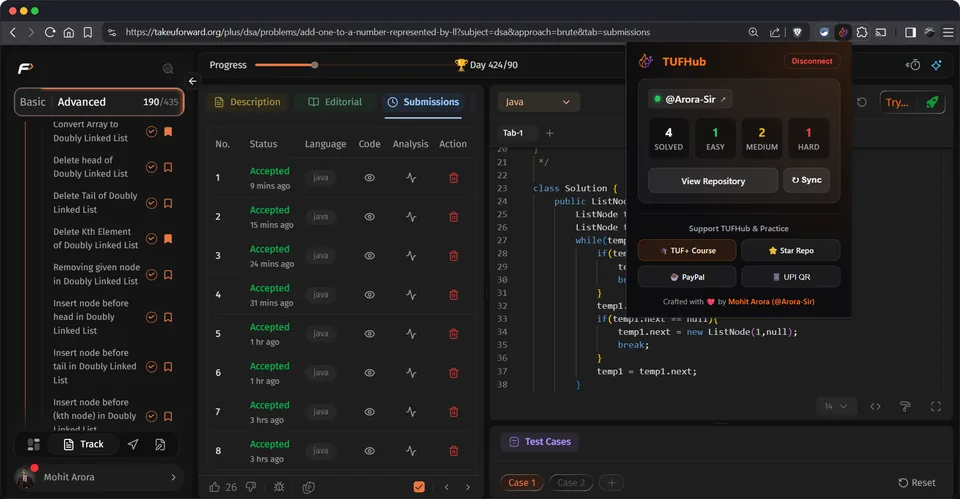
Clean extension popup dashboard with live problem counters and 1-click manual sync.

Connect a registered GitHub OAuth App with a guided, pre-filled registration link.

Every solution lands in a clean, topic-organized folder structure on GitHub.

Track Solved, Easy, Medium, and Hard counts right from your Chrome toolbar.

Prefer a PAT over OAuth? Paste a token with repo scope and you're connected.

Triggers instantly when your solution passes 100% of test cases on TakeUForward.

Maintains an updated markdown table with links, difficulty badges, and dates.
Connect TakeUForward to GitHub in 3 simple steps.
Add TUFHub from the official Chrome Web Store with 1 click.
Connect via Personal Access Token (PAT) or OAuth and select your solutions repository.
Solve any DSA problem on TakeUForward and watch your solution land on GitHub automatically!
Click any question to reveal the details.
Yes, 100% free and open source under the MIT License. You can inspect, fork, or contribute to the entire codebase on GitHub.
TUFHub only requests access to takeuforward.org (to detect 100% accepted submissions) and api.github.com (to push solutions to your repo). It never accesses or tracks any other websites.
TUFHub supports C++, Java, Python, JavaScript, C#, Go, and SQL solutions with proper language file extensions.
No. TUFHub filters out failing or incomplete attempts and only commits solutions when your submission achieves a 100% pass result on TakeUForward.